01REGION PRICE GAP
Switch the storefront region you actually use.
The current lowest reference is Philippines at $162.47, about $37.53 below the U.S. benchmark.
Potential saving: $37.53Learn how to change regionCompare the country price first, prepare safe form-test data when you are testing a flow, then check whether an eligible Bybit Card offer lowers the final cost.
The current lowest reference is Philippines at $162.47, about $37.53 below the U.S. benchmark.
Potential saving: $37.53Learn how to change regionCreate a test name, fictional street, matching city/state/ZIP and reserved test phone in one click.
For development, prototypes and form QA onlyOpen the address test generatorCheck eligibility, make sure the invite code appears before submitting, and review the current reward rules.
ZRN097PStorefront prices are dated references, not a promise that you qualify to buy in that country. Final tax and checkout rules are controlled by the provider.
At the checked exchange rate, that is about $162.47 instead of the $200.00 US reference — roughly $37.53 less before tax and card fees.
Open ChatGPT in the Apple App Store and check that the storefront is Philippines.
Settings → your name → Media & Purchases → View Account → Country/Region. Only continue if you can legitimately use the region and its accepted payment method.
In In-App Purchases, distinguish the 20x tier from 5x and confirm the 20x price is ₱ 9,990.00 before paying.
Use billing and payment details accepted for your Apple Account region, then verify the tier, currency, tax, and total.
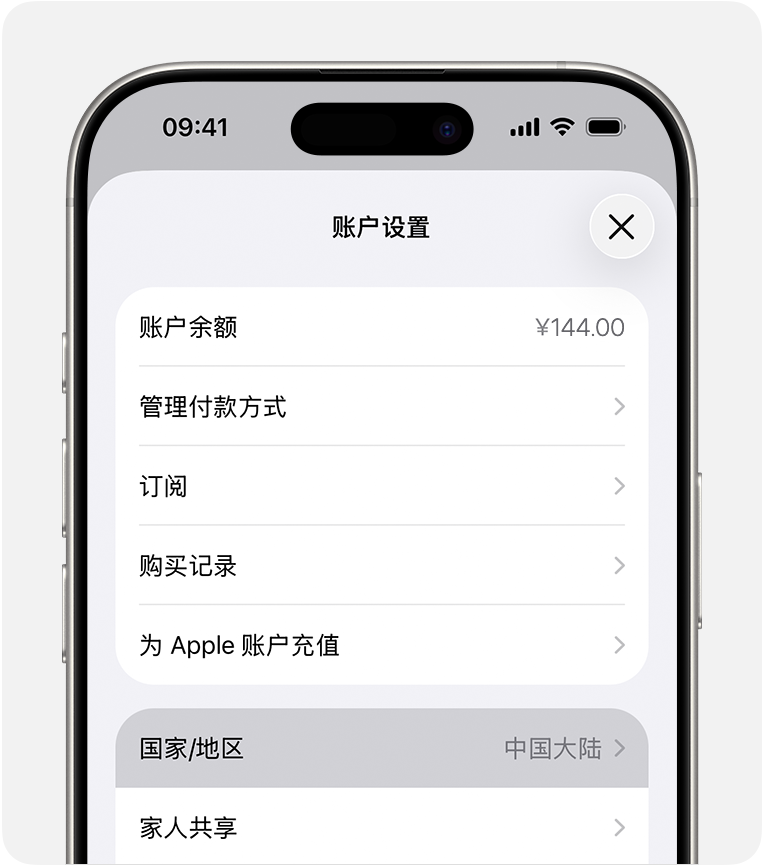 02↘Country / Region
Apple Account Country/Region → Philippines → ChatGPT App Store listing → In-App Purchases → ChatGPT Pro 20x.
The useful version is a billing checklist: only use your real address and a valid tax ID or exemption when you actually qualify.
The beginner guide below covers residence eligibility, buying USDT, matching the transfer network, applying for the virtual card, and paying the merchant.
Jump to the card application guideThis route is for users who genuinely live in a supported region. The invite link or code must be attached to the first card application before you submit it.
Open the application from our dedicated link. At “Confirm Your Information,” check that the card referral code is filled in. Bybit says it cannot be added or changed after submission.
ZRN097PContact us to check whether the code appeared, where to find the virtual card, which Claude checkout to use, and where to review transaction or pending-point status.
SubAtlas support is independent guidance, not Bybit customer service. We cannot approve cards, alter referral codes, or guarantee rewards.A complete walkthrough for first-time users: check eligibility, set the correct store region, buy USDT where available, transfer it safely, apply for the card, and pay the merchant.
Bybit eligibility follows your real residence and KYC documents, not your language, nationality, VPN location, or a generated address.
Use this only after you have genuinely moved or otherwise meet Apple's requirements for the new region. A cheaper price alone is not eligibility.
↙Tap hereThis route is only for users who are legally allowed to use both platforms in their registered region. OKX calls this P2P; availability and fiat currency follow the verified account region.
Open Bybit's USDT deposit page first and note the networks currently available. On OKX, compare the withdrawal fee for those same networks. When both sides show them, Aptos and Avalanche C-Chain are useful low-fee candidates.
Choose the lowest live fee among overlapping networks, not a fixed favorite. Availability, minimums, fees, and maintenance change; send a small test first.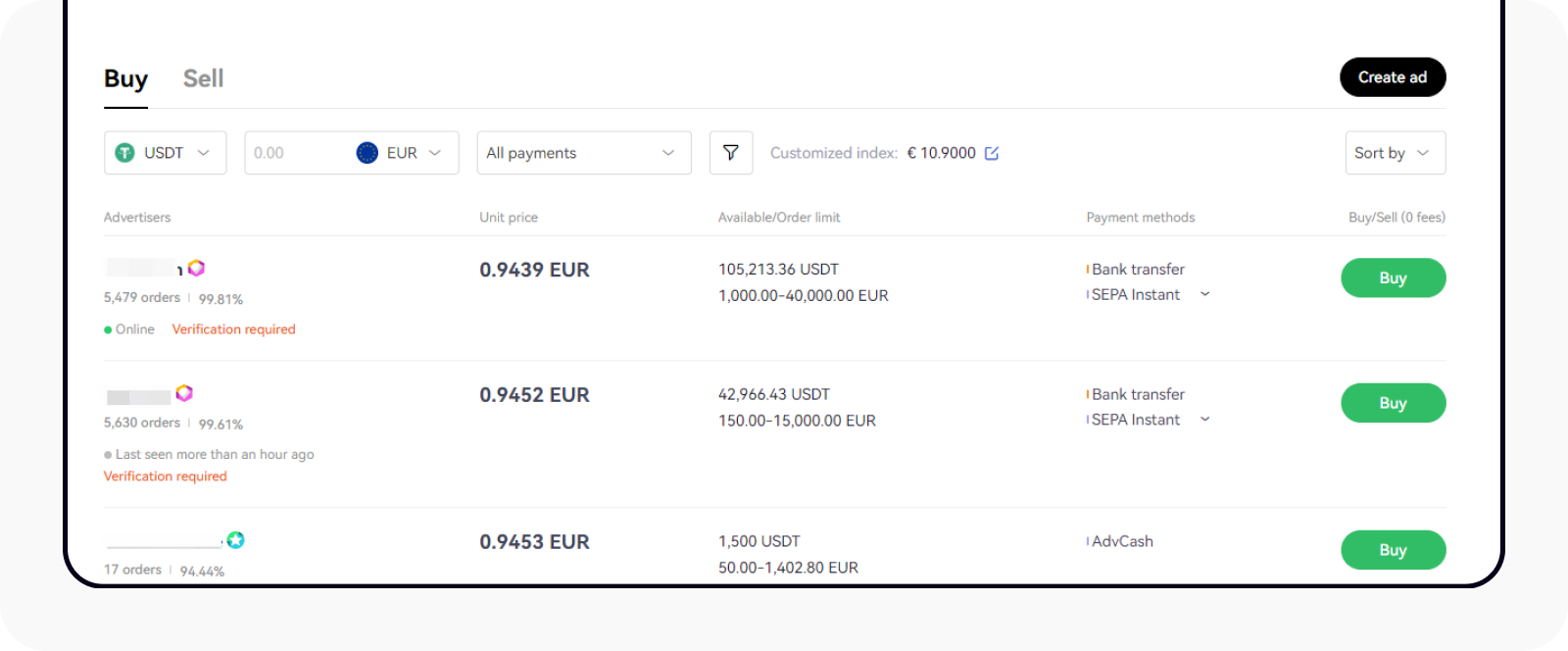 ↘Buy USDT
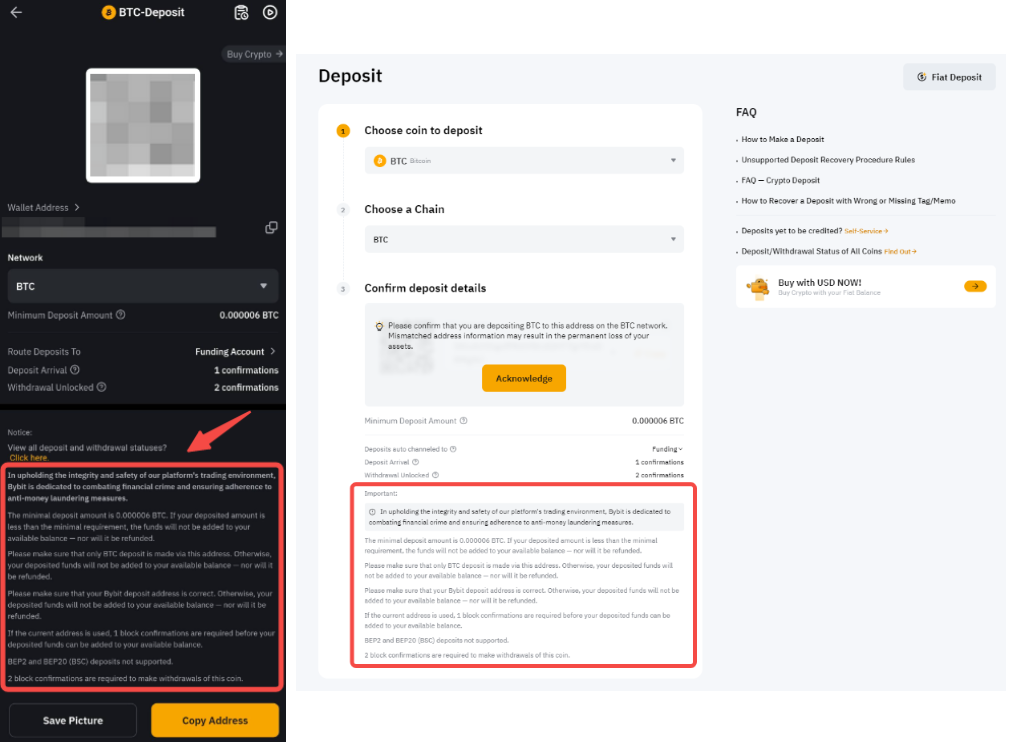 ↙Copy address + chain
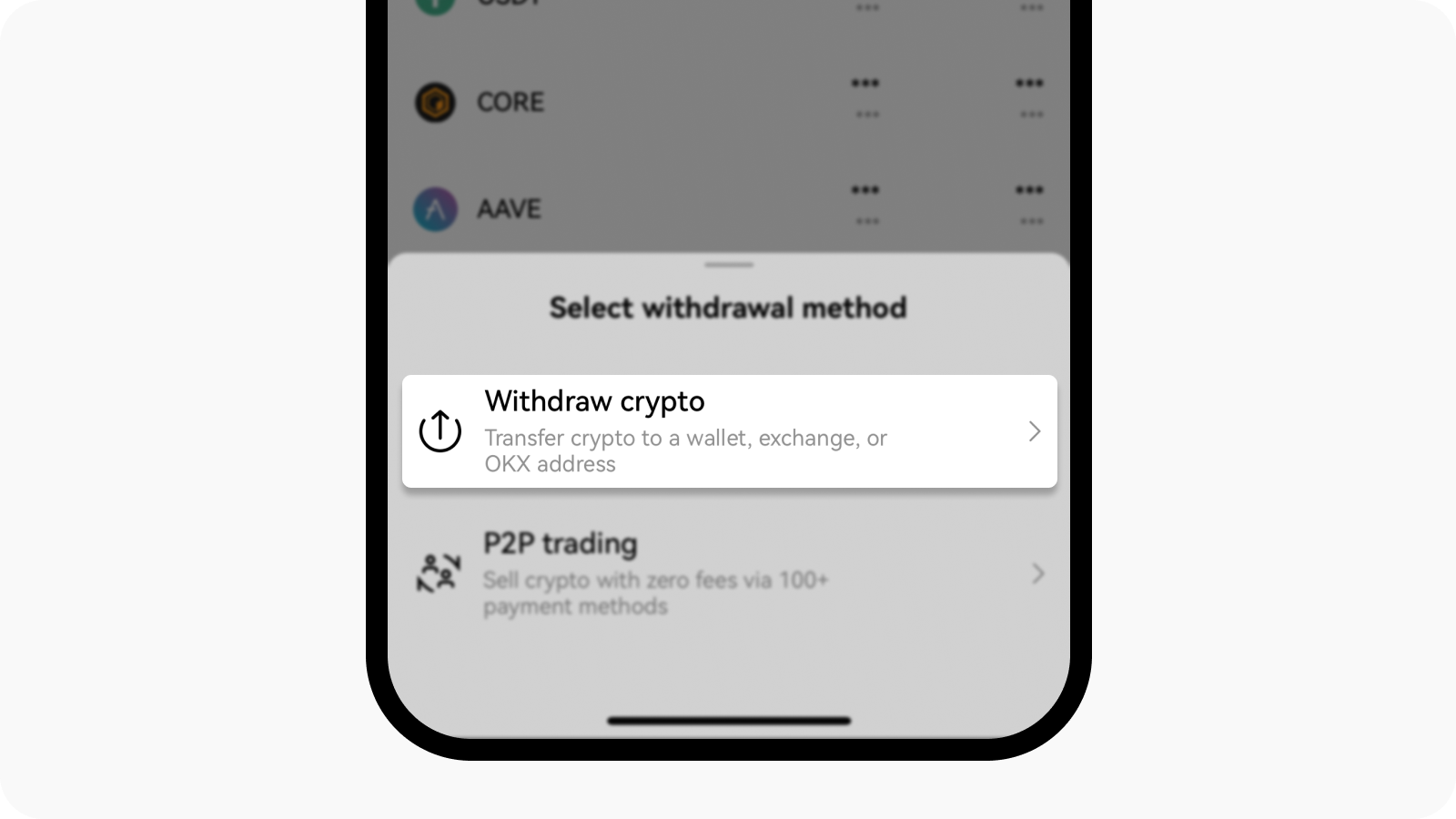 ↘Withdraw crypto
USDT on the sending side must go to a Bybit USDT address on the same supported network. A mismatch can permanently lose funds.
Check the minimum deposit and withdrawal fees, send a small amount, and wait until Bybit credits it before sending the rest.
OKX can apply T+N protection after a P2P purchase. If the order shows a lock, wait until the displayed unlock time; do not try to bypass it.
The payment account name must match your verified OKX identity. Never pay outside the order or accept a third-party payment request.
Use this entry only where OKX is available to you. It is the account used in the USDT purchase and withdrawal walkthrough below.
OKX INVITE CODE28615419This is an optional funding-platform entry for users whose real region is supported. It is separate from the Bybit Card invitation.
BINANCE INVITE CODE574758729The card application checks residence, identity, address, and sometimes income or source-of-funds information. Approval is not guaranteed.
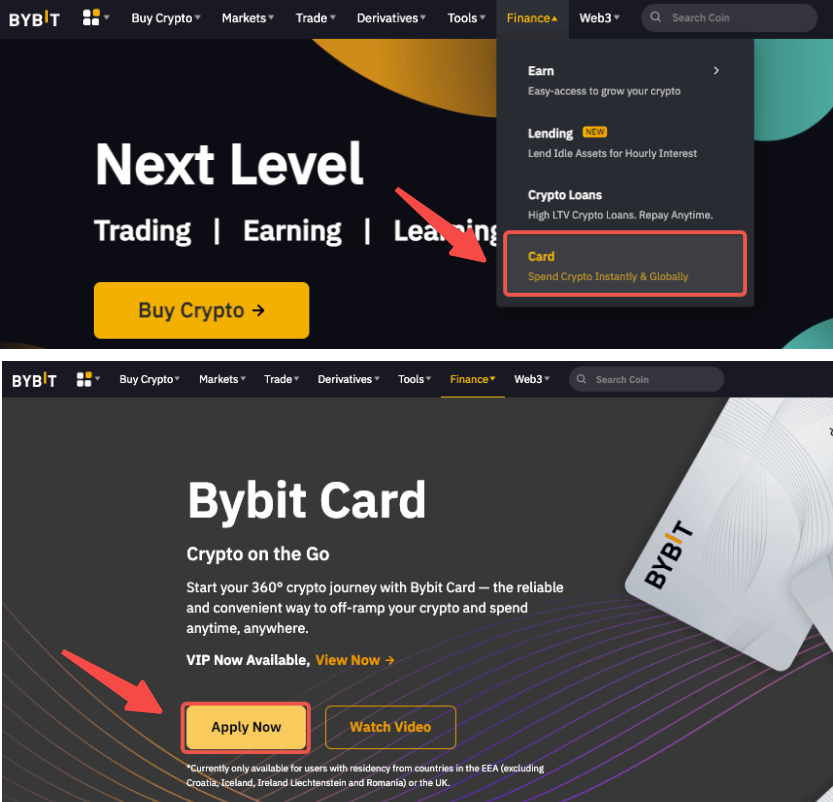
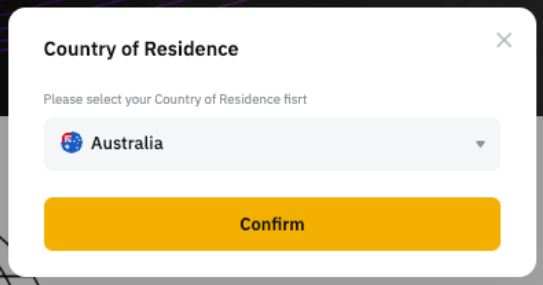
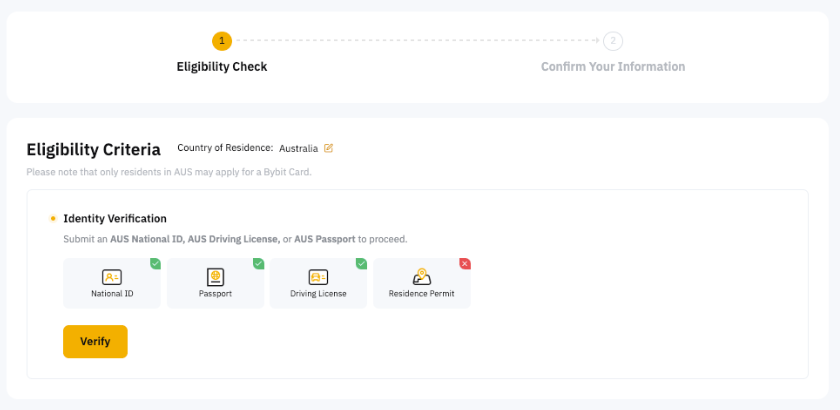
Open the application from the dedicated link and check the code on Confirm Your Information. Bybit says it cannot be added or changed after submission.
Apply through the dedicated Bybit Card link · ZRN097PA virtual-card review can take a few minutes and, in some cases, up to seven working days.
Keep enough supported fiat or crypto in Funding Account and set the card's crypto payment priority.
Use the virtual card on the eligible merchant's official checkout, then complete 3DS, OTP, or app approval if prompted.
Choose the problem you have now. Internal links jump to the matching step; external links open the official platform page in a new tab.
Return to the residence check before opening an exchange or card application.
Check residence firstCompare the withdrawal record with the Bybit deposit page: coin, chain, address, memo/tag, minimum and confirmations.
Use the application guide for review steps and the reward page for eligible merchants, tiers, caps and timing.
Open the official pricing page, confirm the exact plan, and pay only through an eligible official checkout.
We link directly to official domains whenever possible. Always re-check the domain and live eligibility notice before entering credentials or paying.
Screenshots come from the linked official help pages and may change after an app or website update. Follow the live screen and official rules when they differ.
Each page solves one task. Open only the price, payment, card, OKX or Binance guide you need.
Compare the plan, country price, tax, payment fee and eligible card reward before calling an offer a deal.
ChatGPT subscription dealsCompare the same plan across supported storefronts with current exchange rates; the lowest reference updates with the data.
cheap ChatGPT subscriptionCheck recurring-payment support, real billing details, foreign-exchange costs and common decline reasons before choosing a card.
ChatGPT virtual cardCheck country eligibility, verification, the card referral code, funding and reward limits in the correct order.
Bybit Card guideA beginner route for buying USDT where available, matching the deposit network and testing a small transfer first.
buy USDT on OKXFollow identity checks, P2P availability, network matching and a small test transfer before funding another platform.
buy USDT on BinancePro 5x and Pro 20x are different products. Plan identity comes before currency.
Prices, rates, and promotions carry separate checked times.
“100% cashback” may still stop at $50. We calculate the money, not the slogan.
Country, merchant, spending, and card requirements stay beside the deal.